


Meet Travera
A short tour of the platform: registering the lot, the transport to the yard and the delivery to the customer.
Vehicle inventory records
Capture and manage detailed information for every vehicle, including identification data, specs, photos and status.
Check-in and check-out control
Record vehicles in and out quickly and reliably, keeping a complete history of movements.
Document tracking
Manage titles, invoices, permits and every other document tied to each unit from one place.
Advanced search
Find vehicles and records with quick searches by VIN, plates, date, status or other criteria.
Specialized reports
Generate operational, administrative and inventory reports for full visibility of the business.
History and traceability
Keep a chronological record of every action taken on each vehicle for transparent, reliable management.
The yard, from your phone
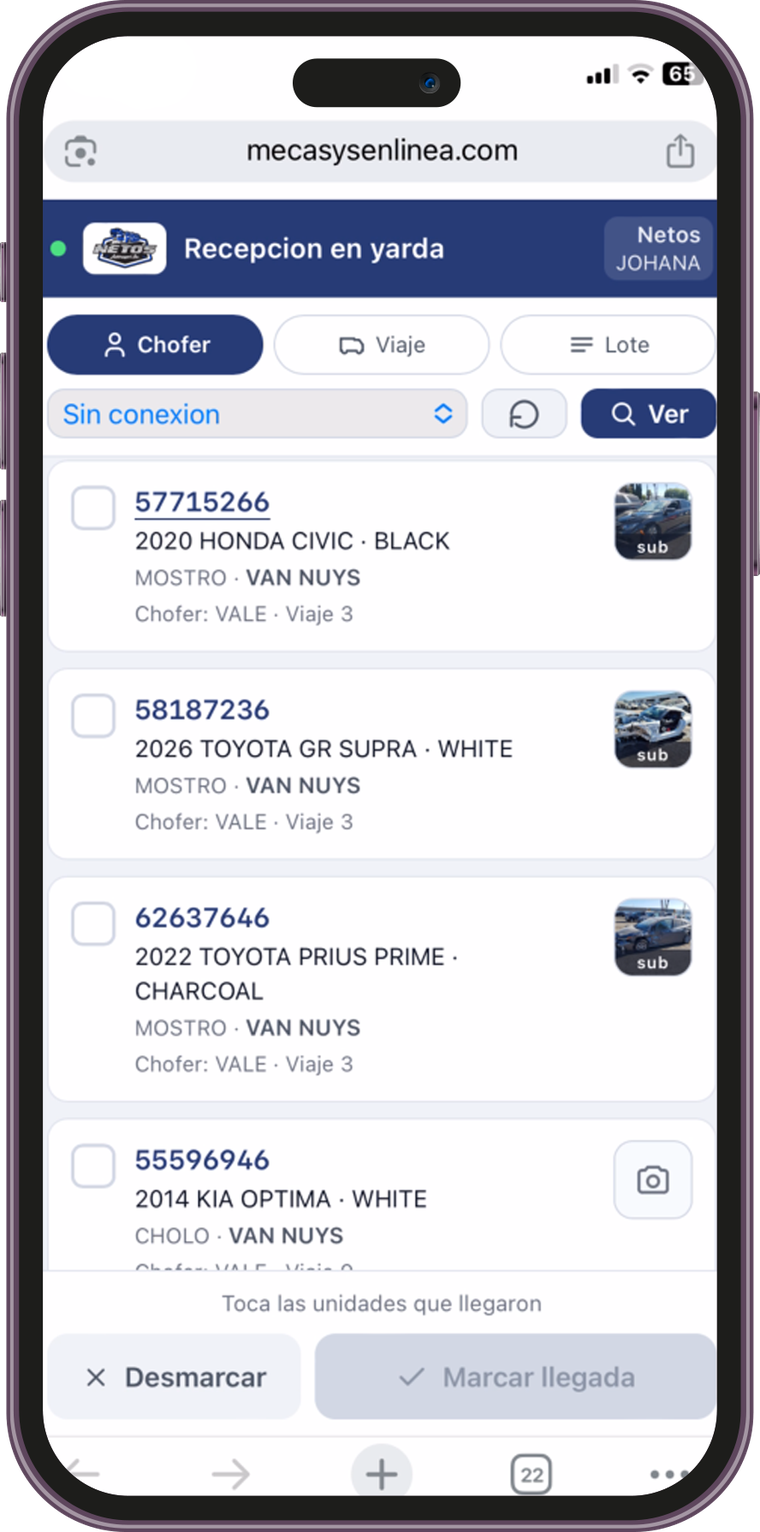
The Travera app is for whoever is out in the yard receiving units. Mark arrivals on the spot, with a photo, and the system knows instantly.
- Yard check-in from the phoneThe yard manager opens the app when the truck arrives and marks the units that came off, with no printed lists or calls to the office.
- Search by driver, trip or lotThree filters to find what just arrived: by the driver who brought it, by the whole trip or by lot number.
- Works with no signalIn yards with no internet, the app keeps marking arrivals and stores what you capture; as soon as there is a connection, it syncs with the system.
- Batch markingSelect several units at once and confirm their arrival in one go, or unmark them if there was a mistake.
- Photos of the unitTake the photo from the same phone and it is stored in the unit's file, as evidence of the condition it arrived in.
- The office sees it instantlyWhat is marked in the yard shows up immediately in the system: yard inventory, trip status and the start of storage days.
- Nothing to installIt runs in the phone's browser, so anyone on your team signs in with their user without downloading an app.
From the auction to your yard
Travera is the system for companies that haul vehicles from auctions to their own yards, store them, and hand them over when the customer comes to pick up and pay.
Vehicle haulers
You pick up units at auctions in the United States and bring them to your yard. Travera tracks every transport, its cost and its status.
Yards and delivery lots
The customer comes for their unit and pays at the counter. The system calculates what they owe, storage days included, and issues the receipt.
Copart and IAAI buyers
Register the lot with its auction photos and follow the unit until you hand it over.
Border operators
Control of units crossing from the United States into Mexico, with the paperwork for each one.
When the yard runs on memory
You don't know what's in the yard
Between what is on the road, what arrived and what was already delivered, the real count becomes guesswork.
Storage isn't fully charged
If nobody counts the storage days, you undercharge and the yard fills up with units nobody moves.
The customer arrives and nobody knows the balance
Someone hunts for the paperwork, recalculates by hand, and the handover takes longer than it should.
There's no evidence of the unit's condition
When a customer claims damage, there are no photos from the moment it was received.
What Travera
Lot registration with auction photos
Register the unit straight from the auction: VIN, lot, specs and photos imported directly, with no retyping.
Transport control
Every unit with its origin, destination, assigned hauler and status, so you always know what is on the road and what has arrived.
Driver assignment
Assign units to each driver, in bulk or one by one, and follow the progress of the trip.
Yard inventory
Which units are in storage, since when and where in the yard, with instant search by VIN or lot.
Storage calculation and payment
The system counts storage days and what the customer owes at pickup, with no math by hand.
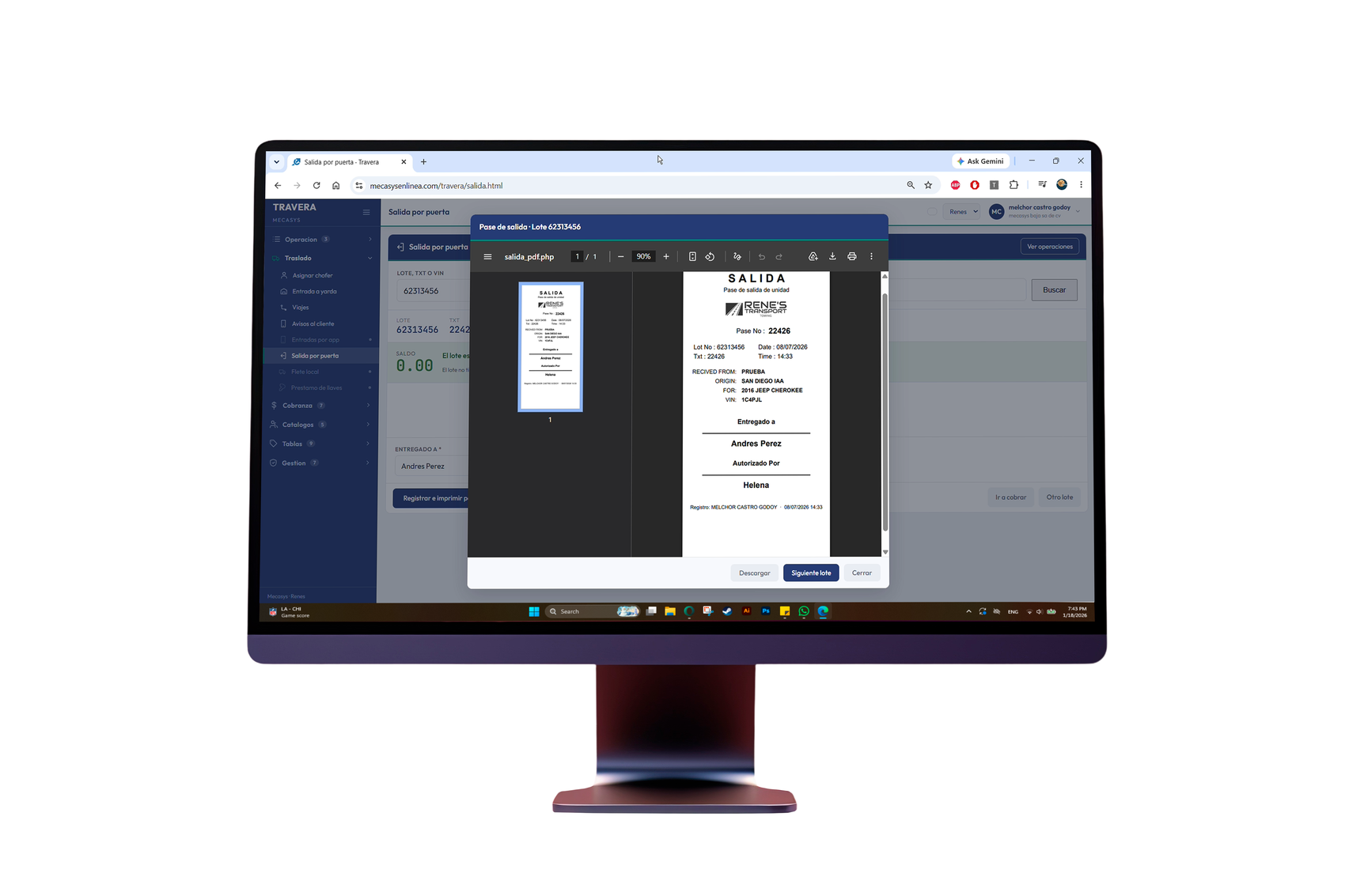
Delivery receipt
A printed receipt at the counter when payment is made, with every charge itemized.
WhatsApp notifications
Notify the customer when their unit reaches the yard and is ready for pickup.
Reports and dashboard
Units in transit, in the yard and delivered, with the information to decide what to move first.
From the auction to delivery
Buy at the auction
Register the lot with its VIN and its auction photos.
Haul to your yard
Assign the driver and follow the trip until the unit arrives.
Storage
The unit enters the yard inventory and the storage clock starts.
Delivery and payment
The customer arrives, the system calculates the balance, you take payment and issue the receipt.
Why a system pays off
Every storage day charged
Storage days are counted automatically, so no money is lost to oversight.
Handovers in minutes
The balance shows on screen and the receipt prints right away.
Evidence from the source
The auction photos stay in the unit's file.
Real inventory
You know exactly what is on the road, what is in the yard and what has left.
Frequently asked questions
What kind of operation is Travera for?
For companies that haul vehicles from auctions to their own yards, store them and hand them to the customer at pickup.
Can I import the lot photos from the auction?
Yes. When you register the lot, Travera imports the unit's photos, so you have evidence of its condition from the source.
How is the customer's balance calculated at pickup?
The system counts the storage days and adds the transport charges, so the balance is already calculated at handover.
Can a receipt be printed at the time of payment?
Yes. When payment is taken, the receipt is issued with every charge itemized, ready to hand over at the counter.
Can I assign units to my drivers?
Yes. You can assign one unit or several at a time to each driver and follow the progress of the haul.
Is the customer notified when their vehicle arrives?
Yes. Travera can notify by WhatsApp when the unit has reached the yard and is ready for pickup.
Can I search for a unit by VIN or lot number?
Yes. Search works by VIN, lot, plates, status and date, and takes you straight to the unit's file.
Do I need to install anything?
No. Travera runs in the browser, from the office, the yard counter or a phone.